
How do I edit my project's sharing and privacy settings?
To access your Sharing and Privacy Settings: first, you must navigate to the Settings window by clicking on the gear icon, found along the top edge of the Editor, in the Project Header.
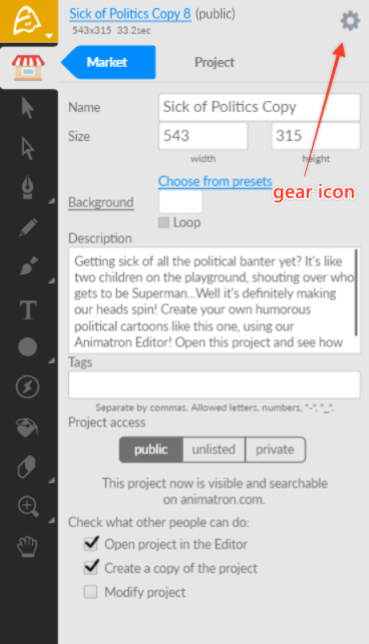
The default privacy setting for new projects is “Public (read-only)”. “Public”, meaning access to your project will be public and anyone can see it in our Public Gallery and open it via the Editor. However, “(read-only)” means that no one can directly edit it unless they make a duplicate copy for themselves.
Privacy Settings: Using the drop-down field at the top of the window, you can choose between 3 settings.
Public - the project is visible in the Animatron Gallery
Unlisted - only people with a direct link can see the project (note: requires a Pro Subscription Plan to access)
Private - only you can see the project (note: requires a Pro Subscription Plan to access)
Sharing Options: Using the appropriate checkboxes next to the selections below your Privacy Settings, you can choose to check ON any of 3 of the following options.
Open project in Editor - Allow others to view this project in the Editor (requires a Pro Subscription Plan to disable)
Create copy of the project - Allow others to duplicate this project and its contents (requires a Starter or Pro Subscription Plan to disable)
Modify project - Allow others to edit this project directly (note: this option will automatically activate the “Open in Editor” and “Copyable” sharing options)